
Costco Wholesale
Costco WholesaleShopping
4.834.89K Reviews
- Version
- 26.10.3
- Installs
- 10.00M
- Age Rating
- Everyone
Screenshots
Our Review of Costco Wholesale
 Analysis by Appyee
I find the Costco app most useful when a shopping trip starts with a practical problem: I need to check a product, make a list, or get my membership ready before reaching the warehouse. It is a free shopping app from Costco Wholesale, and its focus is clear: help members handle common shopping tasks on the go. The app has a 4.7 average from around 440,000 ratings and more than 10 million installs, so it is already a familiar companion for many Costco shoppers. My take is that it works best as a tool for organizing a Costco run, rather than as a replacement for every part of the shopping experience.
That distinction matters. Costco is built around warehouse shopping and large purchases, while many general retail apps are designed for quick, one-off orders. Here, I would use the app to prepare, check details, and make the visit smoother. The strongest benefit is not a flashy feature; it is reducing small bits of friction before and during a trip. The trade-off is that the app makes most sense if Costco is already part of your routine.
From Planning a Trip to Finishing the Shop
The first thing that struck me about the Costco Wholesale app is how easy it is to navigate. You know how some apps make you feel like you're lost in a labyrinth of options? Not this one. The interface is clean and intuitive, making it a breeze to find what you're looking for. Whether you're searching for that gigantic pack of paper towels or a massive jar of peanut butter, it's all just a few taps away.
One feature that deserves a special mention is the search function. It's not just about typing in the product name; you can filter by category, price, and even availability at your local warehouse. It's like having a personal shopping assistant in your pocket. And let's be honest, who doesn't want that?
Start with the question you actually need answered
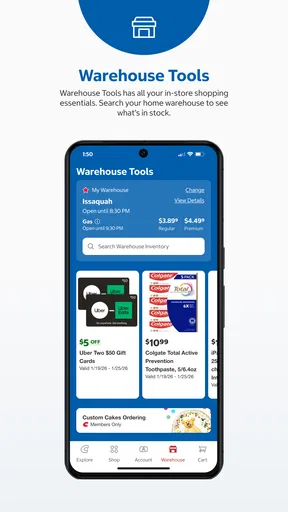
Before a Costco trip, I would begin by deciding what I need to know: whether an item is available at my local warehouse, what alternatives are listed, or whether a product is worth adding to the next bulk shop. Searching first can make the visit more focused, especially when I am buying a specific household staple rather than browsing. A useful habit is to search by the product name and then check the listing carefully; similarly named items or different package sizes can make a quick scan misleading.
Availability checks are helpful for deciding whether a trip is worth making, but I would treat them as a planning aid rather than a promise that an item will still be on the shelf when I arrive. For a routine shop, that distinction is minor. If I am making a special trip for one particular product, I would still keep a backup plan instead of assuming the app guarantees what I will find in the warehouse.
Offers and timing without letting discounts take over
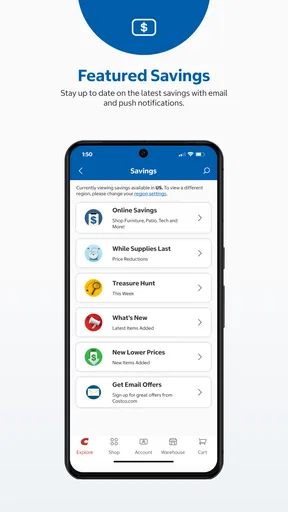
If you're a fan of snagging deals (and who isn't?), the app’s exclusive member offers are sure to get you excited. These offers are tailored to your shopping habits, meaning the app learns what you like and gives you discounts on those items. It's like it reads your mind, but in a non-creepy, totally convenient way.
The app also keeps you in the loop about upcoming sales and special events. So if you're the kind of person who loves planning their shopping trips around big savings, this feature is going to be your new best friend.
I would use offers as a prompt to review a planned purchase, not as a reason to buy something I did not need. Bulk sizes can be attractive on a deal screen, but a discount only helps if I can use the quantity and have room to store it. That small check is especially useful for households with limited cupboard or freezer space. The app can help me notice a saving; I still need to decide whether the item and pack size suit my home.
Build the list before the warehouse gets busy
Have you ever found yourself at the store, trying desperately to remember what you came in for? With the app’s shopping list feature, those days are over. You can create and manage lists right from the app, making it super easy to remember everything you need. Plus, the reorder feature lets you quickly purchase items you've bought before, saving you time and mental energy.
Speaking of time-saving, the app also offers a quick view of your recent orders. This means less time scrolling and more time doing the things you love. Honestly, it's like the app is designed to make your life easier at every turn.
For a realistic weekend run, I would make one list for planned staples and use recent orders to jog my memory about repeat purchases. Then I would check the list before leaving, while I can still remove duplicates or rethink a bulky item. This is more useful than relying on memory once I am surrounded by tempting displays. Reorder is convenient when the item is genuinely the same thing I want again; for changing needs, I would search afresh rather than assume a previous purchase is still the best fit.
One practical trade-off is that a digital list is only helpful if I remember to consult it. I would keep the app easy to reach and glance at the list before entering the warehouse, rather than trying to organize everything while moving through the aisles. If someone prefers a paper checklist or shops at several stores in one trip, a general list app may fit their routine better. Costco’s list is most valuable when the trip itself is centered on Costco.
Membership ready, then choose how to shop
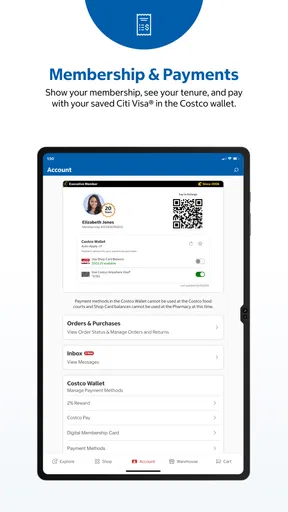
Managing your membership has never been easier. With just a few taps, you can renew your membership, update your details, or even upgrade to an Executive Membership for additional perks. It’s all about making the process as straightforward as possible, which is something I truly appreciate.
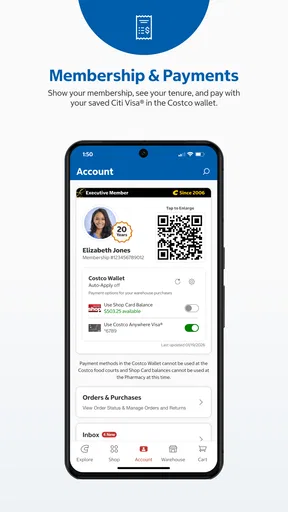
And if you're someone who's prone to losing physical membership cards, fear not. The app provides a digital membership card that you can use at checkout. No more frantic digging through your wallet at the register. Hallelujah!
This is a useful handoff from planning on the phone to shopping in person: I can sort out membership details beforehand, then bring up the digital card when it is needed. I would check that I can access the app before setting off, rather than discovering at the entrance or checkout that I need to sign in again. Keeping a physical card as a backup may also suit shoppers who do not want to depend on their phone throughout the visit.
Warehouse, delivery, and the point where choices diverge
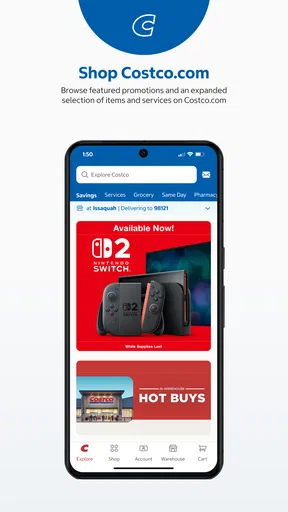
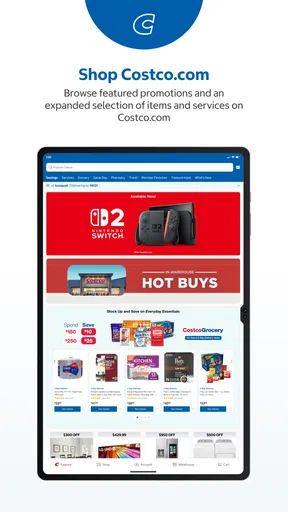
One of the standout features of the Costco app is its seamless integration of in-store and online shopping. You can check product availability at your local warehouse, place an order for delivery, or even set up a pickup. It's all about giving you options, which is fantastic for those days when you just can't make it to the store.
I also love that the app provides detailed product descriptions, reviews, and even price comparisons. It feels like Costco genuinely wants to help you make informed decisions, which is a refreshing change from the usual hard sell tactics.
These shopping routes are not interchangeable in practice. If I want to inspect a product or combine several errands in one outing, the warehouse is the natural choice. If carrying bulky items is the main obstacle, delivery or pickup may be more appealing when the option is available for the item and location. I would check the details shown for a particular purchase before committing, because the best route depends on what I am buying and how I plan to receive it.
Compared with a general marketplace app, Costco’s appeal is its connection to the warehouse, membership, and bulk-buying routine. A general retailer may be more convenient for a single small item or for comparing a wider mix of sellers. A supermarket app may suit a weekly shop focused on fresh groceries. I would choose Costco when the purchase benefits from its warehouse selection or member offers, not simply because I want the fastest way to buy one everyday item.
Who gets the most from it—and who may not
The app is a good fit for existing members who visit regularly, buy repeat household products, or want to prepare before committing to a warehouse trip. It can also help someone who is deciding whether to make an in-person visit or use an online option. Costco Wholesale is the developer, and the app is rated for Everyone. Its current version is 26.8.1.1 and it requires iOS 12 or later, which is worth checking against an older device before downloading.
Someone who rarely shops at Costco, does not want a membership-based shopping routine, or mainly needs small quantities may get less value from it. I would also skip treating it as a universal price-comparison tool: its search and product information help with Costco decisions, but shoppers who want to compare many retailers may prefer a broader shopping service. The app is free, but the useful question is whether Costco itself fits your buying habits.
Where the smooth workflow can snag
The app cannot remove the basic decisions that come with warehouse shopping. A product appearing in a search does not settle whether its quantity is right for your household, and a deal can still lead to an unnecessary purchase. Checking listings, building a list, and preparing membership details make the trip more deliberate, but they do not eliminate the need to verify what you need and what you can store.
There is also a small dependence on having your phone ready at the moments the app matters: checking a list, reviewing an item, or showing the digital card. If you prefer to shop without using a phone, the app is less essential; the physical shopping experience remains the point. For me, that is a sensible limitation rather than a reason to avoid it, as long as I treat the app as a helpful companion and not the only way to complete a trip.
A practical verdict for Costco shoppers
In a world where convenience and savings are king, the Costco Wholesale app stands tall. It's not just an app; it's a tool that makes shopping smarter and more efficient. From personalized offers to seamless membership management, it feels like this app was designed with the user in mind. If you're a Costco member or considering becoming one, downloading this app should be a no-brainer.
So, would I recommend the Costco app? Absolutely. It's a game changer for anyone who loves a good deal and values convenience. Give it a try, and you might just find yourself wondering how you ever lived without it.
My recommendation comes with one qualification: it is most convincing when it supports a shopping pattern you already have. Use it to check, plan, and keep membership details close, while staying selective about offers and bulk quantities. If Costco is part of your regular routine, the app can make the steps between deciding what to buy and completing the trip feel more organized. If it is not, a store-neutral shopping list or another retailer’s app may be the more useful tool.
Privacy and Permissions
See what permissions an app requests and how it handles your data.
- Location
- approximate location (network-based), precise location (GPS and network-based)
- Phone
- read phone status and identity
- Photos/Media/Files
- read the contents of your USB storage, modify or delete the contents of your USB storage
- Storage
- read the contents of your USB storage, modify or delete the contents of your USB storage
- Camera
- take pictures and videos
- Microphone
- record audio
- Wi-Fi connection information
- view Wi-Fi connections
- Device ID & call information
- read phone status and identity
- Other
- view network connections, change network connectivity, full network access, run at startup, reorder running apps, control vibration, prevent device from sleeping, read Google service configuration
Verdict
Strengths of Costco Wholesale
- User-friendly interface for easy navigation.
- Exclusive member-only discounts and deals.
- Efficient order tracking system.
- Wide range of products available.
- Secure payment and checkout process.
Limitations of Costco Wholesale
- Limited features for non-members.
- Occasional app crashes reported.
- Requires strong internet connection.
- Limited customization options.
- Delayed customer support response.
Similar Picks in This Category
View All
SHEIN-Shopping Online
Roadget Business PTE. LTD.4.8

Amazon Shopping
Amazon Mobile LLC4.4


Mercado Libre: Compras online
Mercado Libre4.8

Wish: Shop and Save
Wish US Holdings LLC4.7

Alibaba.com - B2B marketplace
Alibaba Mobile4.4
Frequently Asked Questions
What features does the Costco Wholesale app offer?
The Costco Wholesale app provides a range of features designed to enhance the shopping experience. Users can view current deals and promotions, access their membership card, create shopping lists, and check warehouse inventory. Additionally, the app offers a barcode scanner for quick price checks and a pharmacy section for prescription management.
Is the Costco Wholesale app free to download and use?
Yes, the Costco Wholesale app is free to download for both Android and iOS devices. However, to access certain features, such as viewing prices or purchasing items, a Costco membership is required. The app itself does not incur any additional costs beyond your standard membership fees.
Can I shop online using the Costco Wholesale app?
Absolutely, the app allows users to shop online directly. You can browse a wide variety of products, add items to your cart, and proceed to checkout seamlessly. The app supports delivery and offers a convenient way to track your orders. It’s a great tool for those who prefer shopping from home.
Does the app support digital membership cards?
Yes, the Costco Wholesale app supports digital membership cards, allowing you to access your membership details directly from your smartphone. This feature eliminates the need to carry a physical card, making it convenient for quick checkouts and accessing member benefits while shopping in-store.
How secure is the Costco Wholesale app?
The Costco Wholesale app prioritizes user security by implementing robust encryption and security protocols. Personal and payment information is protected, and users are encouraged to use strong passwords. Additionally, the app offers secure login options, such as biometric authentication, to safeguard user accounts.
